



FutureNet
NXR,VXRシリーズ
無線LAN編
5. 無線LAN設定(NXR-G540シリーズ)
5-4. 無線 LAN 設定(802.11ax/5 GHz/VAP)
VAP(仮想アクセスポイント)機能を利用して、SSID ごとにネットワークを分割する設定例です。本設定により、1 台のルータを仮想的に複数のアクセスポイントとして動作させ、用途ごとに無線 LAN ネットワークを分離します。
【 対象機種 】NXR-G540/W、NXR-G540/LW-CA(2026 年 1 月時点)
※ 対応機種は今後変更される可能性があります。最新情報は、各製品の更新履歴またはユーザーズガイドをご確認ください。
| コンテンツ | |||||
| 構成図 | 設定例 | 設定例解説 | 端末の設定例 | 補足 | 付録 |
【 構成図 】
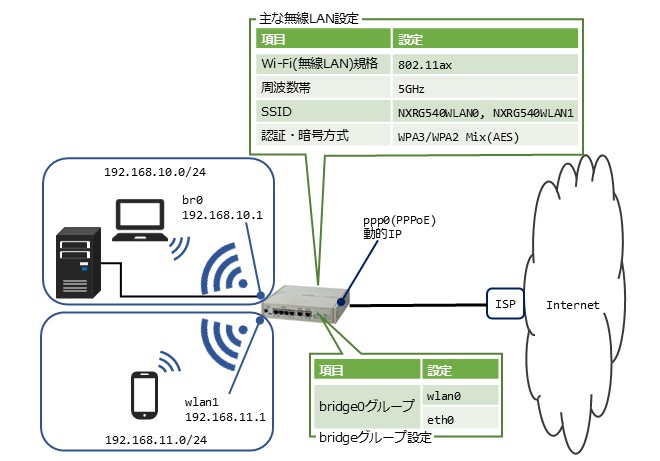
- 有線 LAN インタフェース(ethernet0)と無線 LAN インタフェース(wlan0)をブリッジ接続します。
- bridge0 および wlan1 インタフェース上で DHCP サーバを動作させ、無線 LAN 端末および有線 LAN 端末に IP アドレスを自動的に配布します。
- ルータへの SSH および HTTP アクセスは bridge0 インタフェース経由の通信のみ許可します。wlan1 インタフェースからはアクセスできません。
【 設定例 】
nxrg540(config)# ip access-list br0_IN permit 192.168.10.0/24 192.168.10.1 tcp any 22
nxrg540(config)# ip access-list br0_IN permit 192.168.10.0/24 192.168.10.1 tcp any 880
nxrg540(config)# interface bridge 0
nxrg540(config-bridge)# ip address 192.168.10.1/24
nxrg540(config-bridge)# ip access-group in br0_IN
nxrg540(config-bridge)# exit
nxrg540(config)# interface ethernet 0
nxrg540(config-if)# no ip address
nxrg540(config-if)# bridge-group 0 port 1
nxrg540(config-if)# exit
nxrg540(config)# interface wlan 0
nxrg540(config-wlan)# no ip address
nxrg540(config-wlan)# bridge-group 0 port 2
nxrg540(config-wlan)# wlan ssid NXRG540WLAN0
nxrg540(config-wlan)# wlan wpa-psk password nxrg540wlan0pass
nxrg540(config-wlan)# wlan authenticate wpa3-sae aes
nxrg540(config-wlan)# wlan guest-mode enable
nxrg540(config-wlan)# wlan access-point-bridge enable
nxrg540(config-wlan)# wlan max-associations 64
nxrg540(config-wlan)# exit
nxrg540(config)# interface wlan 1
nxrg540(config-wlan)# ip address 192.168.11.1/24
nxrg540(config-wlan)# wlan ssid NXRG540WLAN1
nxrg540(config-wlan)# wlan wpa-psk password nxrg540wlan1pass
nxrg540(config-wlan)# wlan authenticate wpa3-sae-transition aes
nxrg540(config-wlan)# wlan guest-mode enable
nxrg540(config-wlan)# wlan access-point-bridge enable
nxrg540(config-wlan)# wlan max-associations 64
nxrg540(config-wlan)# exit
nxrg540(config)# wifi 0
nxrg540(config-wifi)# mode 11ax 5ghz
nxrg540(config-wifi)# channel auto
nxrg540(config-wifi)# exit
nxrg540(config)# dhcp-server 1
nxrg540(config-dhcps)# network 192.168.10.0/24 range 192.168.10.200 192.168.10.210
nxrg540(config-dhcps)# gateway 192.168.10.1
nxrg540(config-dhcps)# dns-server 192.168.10.1
nxrg540(config-dhcps)# exit
nxrg540(config)# dhcp-server 2
nxrg540(config-dhcps)# network 192.168.11.0/24 range 192.168.11.200 192.168.11.210
nxrg540(config-dhcps)# gateway 192.168.11.1
nxrg540(config-dhcps)# dns-server 192.168.11.1
nxrg540(config-dhcps)# exit
nxrg540(config)# ip route 0.0.0.0/0 ppp 0
nxrg540(config)# ppp account username <ISP接続用ユーザID> password <ISP接続用パスワード>
nxrg540(config)# interface ppp 0
nxrg540(config-ppp)# ip address negotiated
nxrg540(config-ppp)# ip masquerade
nxrg540(config-ppp)# ip spi-filter
nxrg540(config-ppp)# ip tcp adjust-mss auto
nxrg540(config-ppp)# ppp username <ISP接続用ユーザID>
nxrg540(config-ppp)# exit
nxrg540(config)# interface ethernet 1
nxrg540(config-if)# no ip address
nxrg540(config-if)# pppoe-client ppp 0
nxrg540(config-if)# exit
nxrg540(config)# dns
nxrg540(config-dns)# service enable
nxrg540(config-dns)# exit
nxrg540(config)# fast-forwarding enable
nxrg540(config)# exit
nxrg540# save config
【 設定例解説 】
1. <IP アクセスリスト設定>
nxrg540(config)# ip access-list br0_IN permit 192.168.10.0/24 192.168.10.1 tcp any 880
IP アクセスリスト br0_IN を、以下の条件で設定します。
- 送信元 IP アドレスが 192.168.10.0/24、宛先 IP アドレスが 192.168.10.1 の TCP ポート 22 番宛ての通信を許可します。
- 送信元 IP アドレスが 192.168.10.0/24、宛先 IP アドレスが 192.168.10.1 の TCP ポート 880 番宛ての通信を許可します。
※ IP アクセスリストを設定しただけではフィルタリングは動作しません。必ずフィルタリングを行うインタフェースに適用してください。
2. <bridge0 インタフェース設定>
nxrg540(config-bridge)# ip address 192.168.10.1/24
bridge0 インタフェースの IP アドレスを設定します。
IP アクセスグループの in フィルタに、IP アクセスリスト br0_IN を設定します。
3. <有線LAN側(ethernet0)インタフェース設定>
nxrg540(config-if)# no ip address
ethernet0 インタフェースの IP アドレス設定を無効にします。
ブリッジグループを設定します。
※ ブリッジグループ番号は bridge インタフェース番号と同一に設定します。また、ポート番号はブリッジグループ内で重複しない値を設定する必要があります。
4. <無線LAN側(wlan0)インタフェース設定>
nxrg540(config-wlan)# no ip address
wlan0 インタフェースの IP アドレス設定を無効にします。
ブリッジグループを設定します。
SSID を設定します。
WPA3-SAE 認証方式で使用するパスワードを設定します。
※ 本パスワードは、認証方式および暗号化方式の設定より先に設定する必要があります。
認証方式と暗号化方式を設定します。
ゲストモードを有効にします。
※ 本設定を有効にすると ANY 接続拒否機能とステルス SSID が自動的に無効になります。
アクセスポイントブリッジを有効にします。
※ 本設定を有効にするとプライバシープロテクション機能が無効になります。
接続台数の上限を設定します。
5. <無線LAN側(wlan1)インタフェース設定>
nxrg540(config-wlan)# ip address 192.168.11.1/24
wlan1 インタフェースに IP アドレスを設定します。
SSID を設定します。
WPA3/WPA2 併用モードの認証方式で使用するパスワードを設定します。
認証方式と暗号化方式を設定します。
ゲストモードを有効にします。
アクセスポイントブリッジを有効にします。
接続台数の上限を設定します。
6. <無線モジュール(wifi0)設定>
nxrg540(config-wifi)# mode 11ax 5ghz
無線モジュールを 802.11ax(5 GHz)モードで動作させます。
※ 本設定により、5 GHz 帯のチャネル設定が可能になります。
チャネルを自動選択に設定します。
使用するチャネルは、5 GHz 帯で利用可能な周波数の中から自動的に選択されます。
※ mode コマンドが未設定の場合、チャネルは設定できません。
7. <DHCPサーバ設定>
nxrg540(config-dhcps)# network 192.168.10.0/24 range 192.168.10.200 192.168.10.210
nxrg540(config-dhcps)# gateway 192.168.10.1
nxrg540(config-dhcps)# dns-server 192.168.10.1
bridge0 インタフェース上で動作する DHCP サーバを設定します。
nxrg540(config-dhcps)# network 192.168.11.0/24 range 192.168.11.200 192.168.11.210
nxrg540(config-dhcps)# gateway 192.168.11.1
nxrg540(config-dhcps)# dns-server 192.168.11.1
wlan1 インタフェース上で動作する DHCP サーバを設定します。
8. <スタティックルート設定>
デフォルトルートを設定します。
9. <PPPアカウント設定>
ISP 接続用のユーザ ID とパスワードを設定します。
10. <WAN側(ppp0)インタフェース設定>
nxrg540(config-ppp)# ip address negotiated
ppp0 インタフェースの IP アドレスを negotiated に設定します。
IP マスカレード機能を有効にします。
ステートフルパケットインスペクション(SPI)機能を有効にします。
受信パケットの状態を確認し、不正な通信を自動的に遮断します。
TCP MSS の調整機能を auto に設定します。
ISP 接続用のユーザ ID を設定します。
11. <ethernet1インタフェース設定>
nxrg540(config-if)# no ip address
ethernet1 インタフェースの IP アドレス設定を無効にします。
PPPoE クライアントに ppp0 を設定します。
12. <DNS設定>
nxrg540(config-dns)# service enable
DNS 機能を有効にします。
13. <ファストフォワーディング設定>
ファストフォワーディング機能を有効にします。
※ ファストフォワーディングは、パケット転送処理を高速化する機能です。
14. <設定の保存>
設定内容を保存します。
【 端末の設定例 】
| 192.168.10.0/24 | 192.168.11.0/24 | ||
| 有線端末 | 無線端末 | 無線端末 | |
| IPアドレス | 192.168.10.100 | DHCPサーバから取得 | DHCPサーバから取得 |
| サブネットマスク | 255.255.255.0 | ||
| デフォルトゲートウェイ | 192.168.10.1 | ||
| DNSサーバ | |||
【 補足 】
<チャネルの帯域幅設定>
チャネルの帯域幅として 160 MHz を指定します。
802.11ax 環境において無線 LAN の通信速度を向上させたい場合に有効です。
※ チャネルの帯域幅を変更すると、guard-interval、channel、txpower の各設定は初期値に戻ります。
注意事項
- 160 MHz を利用する場合、クライアント側も 160 MHz に対応している必要があります。非対応のクライアントは自動的に 80 MHz 以下で接続されます。
- 160 MHz は利用可能なチャネルが限定され、周囲の電波環境によっては利用できない場合があります。
- 帯域幅が広いため干渉の影響を受けやすく、環境によっては通信品質が低下することがあります。この場合、チャネル帯域幅を 80 MHz に設定することで、通信品質が改善されることがあります。
【 付録 】
目次
更新情報
→ 一覧へ- 2026.04.01NXR,VXR
IPsec編
4-9. Cloudflare WAN 接続(IPsec NAT-T/二重トンネル/ECMP/フェイルオーバー) - 2026.04.01NXR,VXR
IPsec編
4-8. Cloudflare WAN 接続(IPsec/二重トンネル/ECMP/フェイルオーバー) - 2026.03.10CB
CB-230編
1.1 CB-230 シリアルポートからのアラーム(バッテリー電圧異常)を受けてMAをシャットダウンさせる - 2026.03.05NXR,VXR
REST-API編
2-8. exec系,showコマンドの実行(maint/cli) - 2026.01.20NXR,VXR
無線LAN編
5-6. 無線 LAN 設定(802.11ax/6 GHz/RADIUS)
カテゴリ
タグ
- CRG
- DDNS
- DHCP
- DNAT
- DNSインターセプト
- Ethernet
- IIJモバイル
- IKE Modeconfig
- IKEv2 Configuration Payload
- IPinIP
- IPoE
- IPv6
- KDDI
- L2TPv3
- MAP-E
- NGN
- NTTドコモ
- PBR
- Policy Based IPsec
- PPP
- PPPoE
- QoS
- RADIUS連携
- RAシリーズ
- Route Based IPsec
- SMS
- SNAT
- SoftBank
- UPnP
- URL転送
- VLAN
- VRRP
- Web認証
- WiMAX
- コンフィグロールバック
- ネットイベント
- フィルタ
- ブリッジ
- モニタログ
- ワイモバイル
- 仮想スイッチ
- 冗長化
- 無線LAN